
Badge Reader Install Notes
Badge Reader Heights:
Note: Assume all measurements are to the "Center point" of object
| Location - Customer | Interior Heights | Exterior Heights | Distance in from the doorjam | Special Notes | Paint/Color used |
| SASC | 46" from Ground to Badge reader | 47" from ground to center of badge reader. | Exterior: 7.5" from door jam, handle side | + or - 2", varies based on if a light switch is in proximity of badge reader: Adjust to match switch center line | External Boxes: BEHR Chiffon Cream MATTE |
| Wilson's | ADA Compliance is a must with Wilson Properties. |
ADA Compliance
Legal Expectations: No lower than 36" and no higher than 48"
DOJ CFR Part 36 Official Notes:
Height and Reach Requirements
ADA has certain height and reach requirements to allow access for customers in wheelchairs. As these height and
reach limitations may cause the weather overhang on keypads to obstruct the vision of taller customers, PTI sells a
housing for keypads that does not have a weather overhang. APEX keypads may also be flush-mounted in a wall to
prevent this issue. Either of these items may be purchased from PTI.
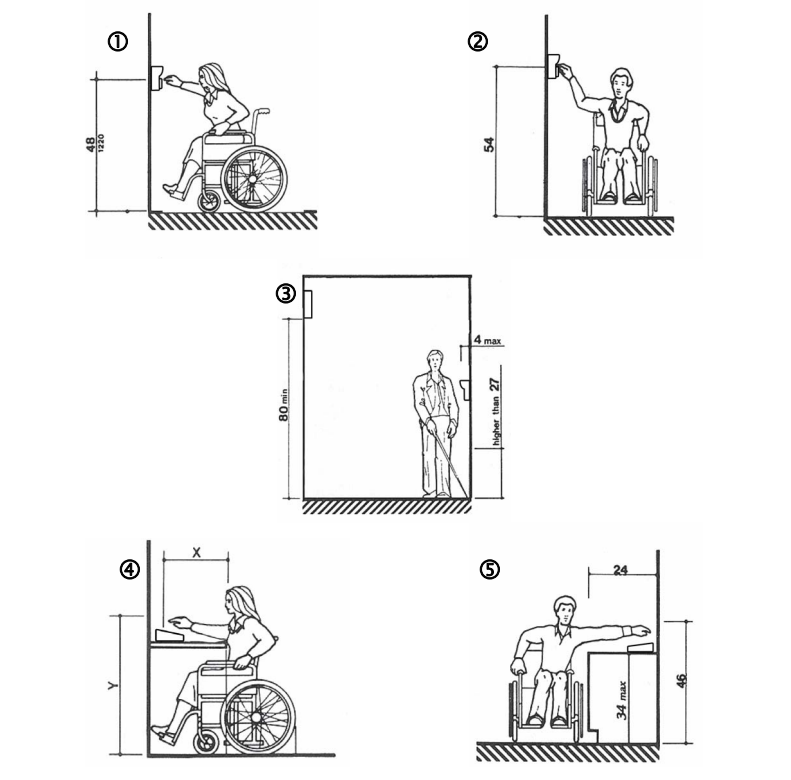
- Keypads should be mounted so that the top of the number touchpad is no more than 48” above the finished
floor with no obstructions in locations where wheelchair access is available only from the front. See Figure 1. - Keypads should be mounted so that the top of the number touchpad is no more than 54” above the finished
floor with no obstructions in locations where the wheelchair has sideways access. See Figure 2. - Keypads should not be mounted so as to protrude more than 4” from the wall. If mounted in a bollard or
pylon, it may protrude up to 12”. Multiplexers and other items mounted higher on the wall or ceiling must be
80” or higher above the finished floor. See Figure 3. - Falcon Base Units and computers should be placed on desks that meet ADA requirements between 28” –
34” tall with no more than 20” in reach depth for obstructed front access or 24” in reach depth for obstructed
side reach access. See Figures 4 & 5. In Figure 4, if X < 20” then Y = 48”. When X = 20” to 25”, then Y =
44”. X should always be ≤ 25”.
Visual CAD:
No Comments