Notes and Standards docs
Notes and Standardization guides
- Labels and CAD Identifications
- Recommended Vendors List
- ARM and Friends Home Servers Project
- Audio|Video Conference Room Designs: 2-4 Person Table Setup
Labels and CAD Identifications
Device, Cable, and Panel Labeling scheme.
----
This is constantly changing as I try to document and standardize what I do in my installations.
Hardware and Labels used:
Printer: Brady M710 Label Maker:

Labels:
| Label Type | Label Size | Brady Part Numer [URL] | Count Per Roll | Estimate Price | Required Ribbon |
| Basic Sticker | 1.0" x 1.0" | M7-19-423 | 250 | $43.50 | |
| Metallic Label | 1.0" x 2.0" | 100 | $40.00 | ||
| Cable Wrap Sticker | 1.5" x 1.0" | 250 | $68.00 | R4300 - $73.00 |
Printable Site Template Guide:
Editable Document: NetworkIdentification.docx
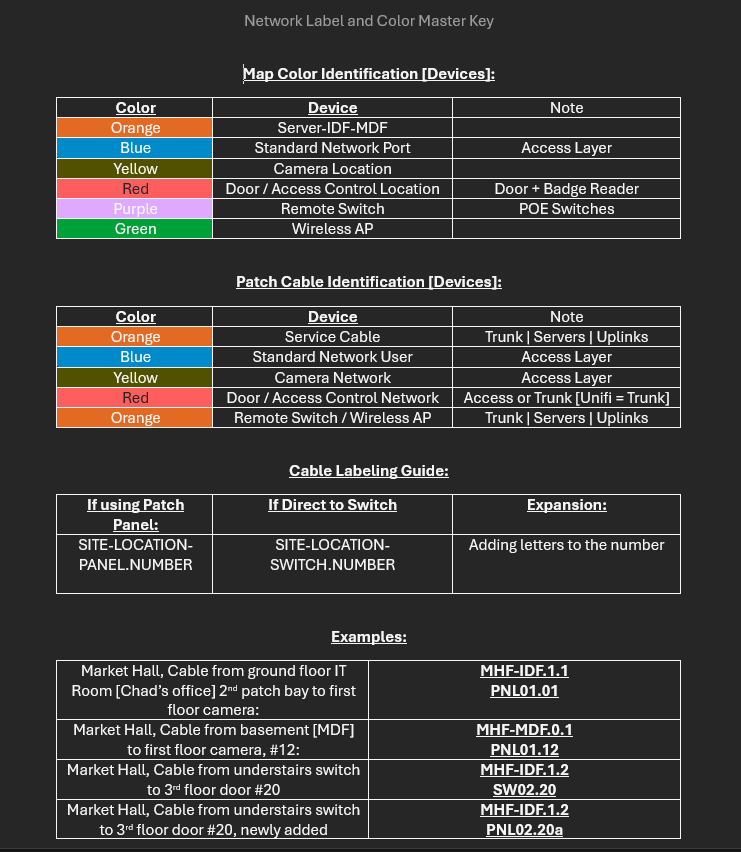
Panels / Doors Labels:
All panels are counted clockwise from either MPOE or Main Entry.
Start at the Main Doorway and count clockwise around the Facility.

| Location/Type | First | Example | Expansion |
| Main Point of Entry | (Site)-MPOE.(Floor).(door) | SASC-MPO.1.6 | N/A - Only 1 MPOE per side |
| Intermediate Distribution Frame | (Site)-IDF.(Floor).(Door) | SASC-IDF.1.1 | IDF-1-1a, IDF-1-1b |
| Media Cabinets/Panels | (Site)-PNL.(Floor).(Panel Number) | SASC-PNL.1.1, SASC-PNL.2.1 | |
| Facility Doors: | (Site)-FL-DR## |
SASC-01-DR01 |
Notes:
MPOE - This is where the internet comes into the building. In residential buildings, it is commonly seen as a utility hidden under stairs or in basements. In large commercial buildings, it's widely known that risers [cables that link IDFs in other floors or wings] are used.
IDF - This is where your switching or server equipment is located to support each floor. This commonly hosts switches that connect back to the MPOE
Cable Labels:
606-B Notes:
Near end = AG09-35:01/AJ06-35:01
Far end = AJ06-35:01/AG09-35:01
If standing at rack location AG09, reading this near-end cable identifier will describe both the near-end and far-end locations.
AG09 = Rack or cabinet at grid location AG09 within the data center
-35 = Patch panel located 35 rack units from the bottom in rack AG09
:01 = Port 01 in patch panel located 35 rack units from the bottom of rack AG09
/ = Separator for near-end/far-end location description
AJ06 = Rack or cabinet at grid location AJ06 within the data center
-35 = Patch panel located 35 rack units from the bottom in rack AJ06
:01 = Port 01 in patch panel located 35 rack units from the bottom of the rack in AJ06
| Examples | First | Example | Expansion |
| SASC Patch Bay to Environment | (Panel Number).(Port Number on Panel) | P6.12 | P6.12a | P6.12b [only applies to split cables] |
| SASC to Device | (Panel Number).(Port Number on Panel) | P6.12 | P6.12a | P6.12b [only applies to split cables] |
| Wilson-MHF | (site)-(IDF#)-(Panel Number).Port Number | MHF-IDF2.1-P1.1 | N/A |
Device Labels:
Controllers: Physical hardware in Panels, Walls or mounted to walls
| Location/Type | First | Example | Expansion |
| Door Access Hub | (site)-CTL.(floor)-(door number) | SASC-CTL.1.05 | SASC-CTL.1.05a |
| Door Intercom | (Acesss Hub)-IntCom | SASC-CTL.1.05-IntCom | IntCom |
| Door Badge Reader | (Acesss Hub)-Reader | SASC-CTL.1.05-Reader |
Network Devices:
| Location/Type | First | Example | Expansion |
| Firewall/Router | (site)-FW## | 925-FW01 | 925-FW02 |
| Switches | (site)-SW## | 925-SW01 | 925-SW02 |
| Cameras | (location)-(object-in-camera) | INTERNAL-CashReg | INTERNAL-CashReg02 |
Notes:
Cameras have special naming schemes. We define them as internal or external to quickly identify access. Tenants and Employees typically can access external cameras, but internal camera access is heavily policed. A camera overlooking a driveway would be called "EXTERNAL-Driveway-North"
Patch Bay printed label templates:
PatchBaySize_12portLevitonKeystone.docx
PatchBaySize_12portSurfacemount.docx
PatchBaySize_24portKeystone.docx
PatchBaySize_48port.docx
PatchBaySize_24port.docx
Wire In between Devices:
2x Layer labels. Order of spanning tree. Top of label = First location. The bottom of the Label = end of the cable.

| Device | Fire | Example | Expansion/Options |
| Device |
Top: Where it terminates Bottom: What it terminates |
|
|
| ISP to Firewall/Router |
(site)-ISP.## [Number or name] FW-Primary-PORT |
MHF-ISP.001 FW-Primary-WAN1 |
ISP-AT&T FW-Secondary-WAN2 |
| Router to Distribution Switch |
FW/ROUT.Port AGGR-##.PORT |
FW-Primary.03 AGGR-01.01 |
FW-Secondary.03 AGGR-02.01 |
| Router/Agg to L3/2 Switch IN MPOE |
AGG-##.Port SW##.Port |
AGGR-01.10 SW01.49 |
AGGR-02.12-BONDa AGGR-02.13-BONDb |
| Patch Cables between IDF/MPOE and the environment |
(thing)-(floor)-(number) Service*-### *NET | *TEL | *COM | |
MHF-IDF.1.2 NET-001 *TEL-001 |
IDF-1-2 NET-001a |
|
Riser Cables [between MPOE, IDF, Panels] |
(site)-(thing).(floor).(number) (site)-(thing).(floor).(number) |
MHF-IDF.1.001 SASC-PNL.2.001 |
IDF-1-1.001a, IDF-1-1.001b PNL-1-2.002a |
| Badge Readers |
(site)-CTL.(floor).(number)-Reader |
SASC-CTL.1.05-Reader | |
| Camera Cable | (thing)-(floor)-(number) CAM-### |
SASC-CAM-1.05 |
|
| Access-Hub (not in panel) |
(site)-CTL.(floor)-(door number) |
SASC-CTL.1.1A | SASC-CTL.1.1B |
| Reader-Flex (no Hub) |
(site)-CTL.(floor)-(door number) |
SASC-CTL.1.1A | SASC-CTL.1.1B |
Badge Reader Install Notes
Badge Reader Heights:
Note: Assume all measurements are to the "Center point" of object
| Location - Customer | Interior Heights | Exterior Heights | Distance in from the doorjam | Special Notes | Paint/Color used |
| SASC | 46" from Ground to Badge reader | 47" from ground to center of badge reader. | Exterior: 7.5" from door jam, handle side | + or - 2", varies based on if a light switch is in proximity of badge reader: Adjust to match switch center line | External Boxes: BEHR Chiffon Cream MATTE |
| Wilson's | ADA Compliance is a must with Wilson Properties. |
ADA Compliance
Legal Expectations: No lower than 36" and no higher than 48"
DOJ CFR Part 36 Official Notes:
Height and Reach Requirements
ADA has certain height and reach requirements to allow access for customers in wheelchairs. As these height and
reach limitations may cause the weather overhang on keypads to obstruct the vision of taller customers, PTI sells a
housing for keypads that does not have a weather overhang. APEX keypads may also be flush-mounted in a wall to
prevent this issue. Either of these items may be purchased from PTI.
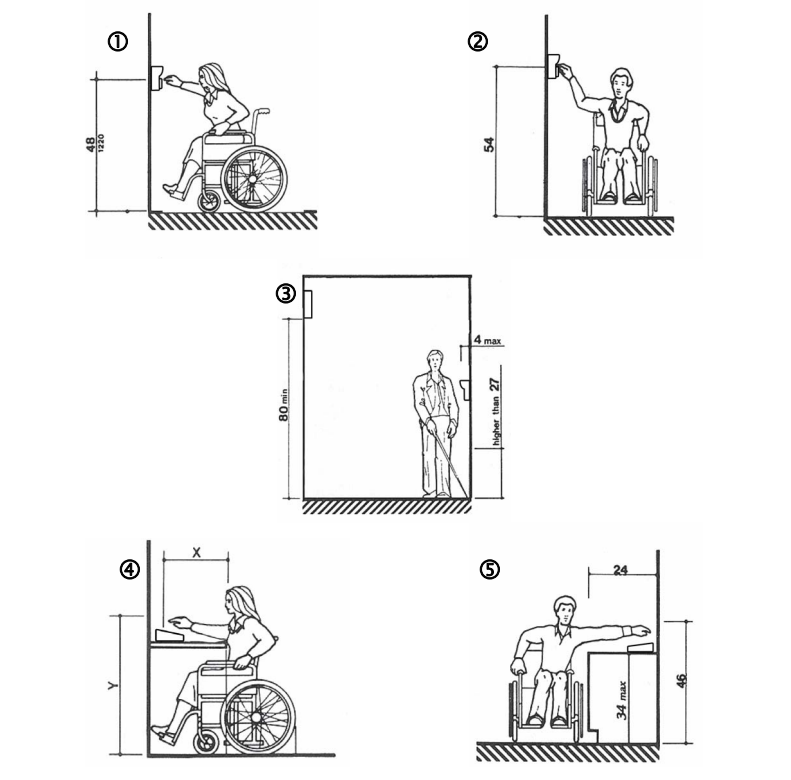
- Keypads should be mounted so that the top of the number touchpad is no more than 48” above the finished
floor with no obstructions in locations where wheelchair access is available only from the front. See Figure 1. - Keypads should be mounted so that the top of the number touchpad is no more than 54” above the finished
floor with no obstructions in locations where the wheelchair has sideways access. See Figure 2. - Keypads should not be mounted so as to protrude more than 4” from the wall. If mounted in a bollard or
pylon, it may protrude up to 12”. Multiplexers and other items mounted higher on the wall or ceiling must be
80” or higher above the finished floor. See Figure 3. - Falcon Base Units and computers should be placed on desks that meet ADA requirements between 28” –
34” tall with no more than 20” in reach depth for obstructed front access or 24” in reach depth for obstructed
side reach access. See Figures 4 & 5. In Figure 4, if X < 20” then Y = 48”. When X = 20” to 25”, then Y =
44”. X should always be ≤ 25”.
Visual CAD:
Recommended Vendors List
Facility Vendors
| Service | Vendor Name [link to website] | Location | Notes/Feedback |
| Locksmith |
Parker Security & Locksmith |
Fremont, CA. Serving the greater East Bay | They're great! Constantly doing their best to make sure we're getting the best price for our needs. They have a walk-in store in Fremont and will do rekeyings on the spot. As someone who "likes to do it themselves," they have been great with supplies and parts for projects, or helping me to install select components on doors while I do low-voltage/wiring. |
IT and System Administration Vendors
| Service | Vendor Name [link to website] | Location | Notes/Feedback |
| Printers |
Contact: office@cortronsystems.com Contact: Devon@cortronsystems.com |
San Jose, CA serves the greater Bay Area
|
We lease 15 Printers, including a very high-end Plotter for a 50+ inch prints. They offer a service that runs on Windows or Linux, though they recommend Windows, which monitors and reports the status of your printers back to them. I have 15 years of career in the IT space, and a Printer can be a real pain in the ass, especially at scale. Cortron is the best I've ever had the opportunity to work with. They're professional, knowledgeable about their technology, and excel in service and support. I've worked with them without issues on various complicated projects. We've upgraded printers in the office, and they have cloned configurations from the old to the new printer without issues, so our end users don't see any change in their process or have to "re-add" devices." |
ARM and Friends Home Servers Project
Reason:
I wanted to build a DVD-ingest tool for Plex to let me and others rip DVDs to our Plex server. I have a stack of 8 small Dell mini desktops that are headed to e-waste. Instead of sending them off, I've taken them and am upgrading them here and there to be remote nodes at friends' houses for adding content to Plex, for hosting Home Assistant, and for running SteamOS as a home media center.
Warning
Expected Outcome:
Each unit will get:
Proxmox 9.2 installed
Custom network configurations for VPNing back to Plex Server
1x LXC Container running ARM [Vlan 10, Disk tray routed to LXC]
1x LXC Container running Home Assistant [Vlan 1, 1x USB port routed]
1x VM running SteamOS [Vlan 1, Graphic card routed, 2x USB port routed]

Research:
Knowledge/Learnings/Links/Notes
Use me to hide long guides
Steps Taken | Work done:
- Step
- by
- step
- process
Audio|Video Conference Room Designs: 2-4 Person Table Setup
Tools Needed:
| Tool Type | Link | Notes |
| Drill - Makita / Milwaukee / Dewalt | Home Depot | |
| 1" Hole Saw Bit | Home Depot | |
| Low Voltage Scissors | Home Depot | Platt is another option |
| 25ft Tape Measure | Home Depot | |
| (optional) Label Maker | Brady | Platt |
Shopping List:
| Accessory Type | Link | Notes |
| 1x C8 to 2x C7 Wye Cable | Amazon.com | Comes in two colors, white or black |
| 1x NEMA 120v to C7 Adapter, 1ft | Amazon.com | Comes in two colors, white or black |
| 1x Flat Plug white extension cord | Amazon.com | Rotating head is a must. Subject to change based on distance from Wall |
| 2x 96 Watt USB C Apple Charger | Apple.com | 100w is fine for most meetings, if you do a lot of image processing, Video editing, CAD designs you might want something closer to 200w |
| 2x 2m 240w USB C Charger Cable | Apple.com | 1m might be all you need |
| 1x 3m 1" Velcro - White | Amazon.com | For mounting the Chargers under the table |
| 1x 1" White Cable Grommit | Amazon.com | |
| White Cable Velcro | Amazon.com | |
| Floor Velcro Cable Covery (For Carpet) | Amazon.com | Not the biggest fan of these but sometimes its the only solution for controlling cables that you can't put in the floor |
Drawing:
